

QR code UTM tags and Google Analytics
Add UTM tags to the link of any dynamic code, and Google Analytics reports the visits it brings as their own campaign. It works on every plan, Free included.
In short
The short answer
- What it does
- UTM tags in a code’s link mark its visits in Google Analytics as their own campaign.
- Where the tags go
- In the code’s destination, in your account. The printed code keeps its short link.
- How to add them
- Type them into the link, or let Google’s Campaign URL Builder build it.
- After printing
- Fix or change a tag in your account, with no reprint.
- Where visits show
- In Google Analytics, under Acquisition, then Traffic acquisition.
- Plans
- Every plan, Free included.
How it works
How do UTM tags work on a QR code?
The tags ride in the destination link. A scan opens the code’s short link, the short link sends the phone to your page, and the tags arrive with it.
A scan has no page it came from. Without UTM tags, Google Analytics cannot tell a scan from a visitor who typed your address.
A dynamic code only holds its short link, so the tags never change the printed code. A static code holds the whole link, and in our test 4 tags grew it from 33 by 33 to 45 by 45 squares. Static or dynamic explains which code to pick.
Step by step
How do I add UTM tags to a QR code?
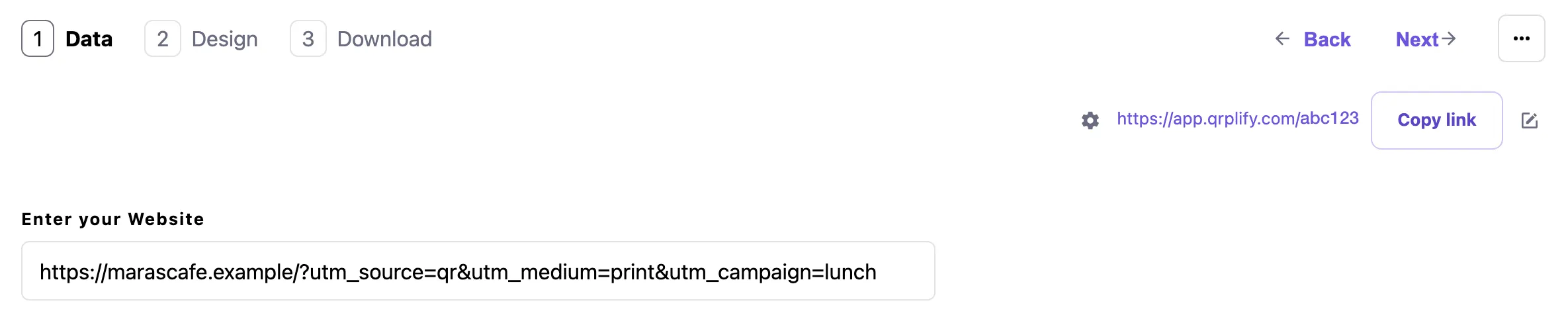
Build the tagged link first, then paste it as the code’s destination.
- Copy your page’s addressOpen the page, let it finish loading, and copy the address from the address bar.
- Open Google’s Campaign URL BuilderPaste the address as the website URL.
- Fill in 3 tagsCampaign source (where the code is, such as flyer), campaign medium (such as qr) and campaign name (such as spring).
- Paste it into your codeIn your account, paste the campaign URL as the code’s destination.
- Always use utm_source, utm_medium and utm_campaign. A missing tag shows as “(not set)” in reports.
- Spell each tag the same way every time. Values are case sensitive, so flyer and Flyer count as 2 sources. Keep them lowercase.
- Pick 1 utm_medium for your printed codes, such as qr, and keep it.
Give each placement its own code, or its own utm_content value, so the flyer, the poster and the table card can be compared. Before you print, scan the code with 2 phones and check the page opens with the tags in its address.
There is no UTM form in your account. The tags are part of the link you paste, and a dynamic code keeps any link you paste, tags included. Google’s Campaign URL Builder builds the tagged link for you.
In Google Analytics
Where do QR code visits show in Google Analytics?
In Google Analytics, open Acquisition, then Traffic acquisition, and look at session source, medium and campaign.
The 2 reports answer different questions. Your QRplify account counts the scans. Google Analytics shows what those visitors did on your page.
Expect Google Analytics to show fewer visits than QRplify shows scans. It counts a visit only when its tag loads on your page, so a blocked or slow load is a scan with no visit.
QR code tracking shows what your account records for each scan, and How to track QR code scans has our test of what a scan sends.
Plans
Which plans include UTM tags?
Every plan, Free included, with unlimited dynamic codes. The plans differ in the QRplify screen: Free shows it on scans past 100 a month, Premium keeps it off 5 codes, and Unlimited keeps it off every code.
Every new account starts with 14 days of Premium, no card needed.
-
Free
$0 forever
Unlimited scans: 100 a month with no QRplify screen
-
Premium
$7.49 a month
Unlimited scans: no QRplify screen on 5 codes
-
Unlimited
$34.49 a month
Unlimited scans, never a QRplify screen
-
Lifetime
$279 once
Unlimited scans, never a QRplify screen
On every plan
- Add UTM tags to any dynamic link
- Google Analytics, through UTM tags
- Unlimited dynamic / editable QR codes
- Analytics (location, device, time)
- Custom short links
In the app
What does it look like in the app?
FAQ
UTM and Google Analytics questions
Short answers, from what the app does today.
Can you add UTM parameters to a QR code?
Yes. In QRplify, add them to the destination link of any dynamic code. The code keeps its short link, so the tags never change the printed pattern.
Can I track QR code scans in Google Analytics?
Google Analytics shows the visits, not the scans. Add UTM tags to the code’s link and it counts each visit whose tag loads. Your QRplify account counts every scan.
Does QRplify connect to Google Analytics 4?
Not directly: there is no Google Analytics setting to link. The connection is the UTM tags on the code’s link. Google Analytics 4 on your site then reports those visits as their own campaign.
Where do QR code visits show in Google Analytics?
Open Acquisition, then Traffic acquisition, and look at session source, medium and campaign.
Do UTM tags stop a QR code from scanning?
Not by themselves, but in a static code they make it denser. In our test, 4 tags grew a static code from 33 by 33 to 45 by 45 squares. In a dynamic code the tags live in the destination, so the printed code does not change.
Can I change UTM tags after printing?
Yes, on a dynamic code. The tags sit in the destination, so you can fix or change them in your account with no reprint.
Are UTM tags free in QRplify?
Yes. UTM tags work on every plan, Free included. On Free, past 100 scans a month, a QRplify screen shows for 3 seconds before the link opens.
Get started
Tag your first code
Static codes need no account. A free account adds unlimited dynamic codes that keep working, with no card.