

QR code custom domain and short links
Every dynamic QR code in QRplify holds a short link. Edit that link on any plan, Free included, or put your codes on your own domain with Unlimited or Lifetime.
In short
The short answer
- Short links
- Every plan, Free included. Edit the slug of each dynamic code’s short link.
- Your own domain
- Unlimited, $34.49 a month, or Lifetime, $279 once.
- DNS record
- A CNAME record at your domain registrar, for a subdomain such as qr.your-website.com.
- Set up time
- Up to 24 hours for the record to be found, then up to 24 hours while QRplify sets up the domain.
- Before you print
- Pick the slug and the domain first. Once a short link changes, printed copies stop working.
- Static codes
- They have no short link. A static code holds your link itself.
Short links
How do I change a QR code’s short link?
Open the dynamic code and click the edit icon by its short URL. Type a new slug, the part after the last slash, and save. It works on every plan.
- Open the codeOpen a dynamic code in your account. Its short URL shows at the top of the page.
- Click the edit iconThe app warns that printed codes stop working once the short URL changes. Confirm to go on.
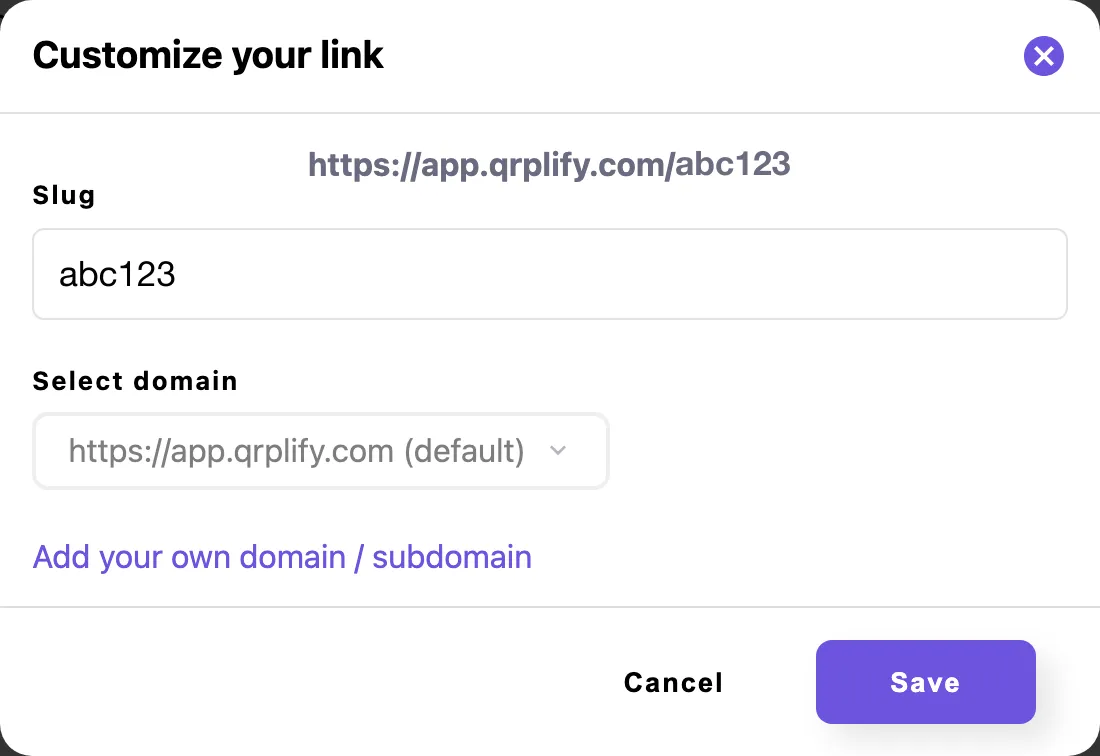
- Type a new slugIn Customize your link, type the words you want after the last slash. Spaces turn into dashes, and the full link shows above the box as you type.
- SaveLeave the slug empty to keep the one you have.
Do this before you print. The printed pattern holds the short link, so once it changes, every printed copy stops working.
To send a printed code somewhere new, change its destination instead and keep the short link. Update a QR code after printing shows the steps.
Your own domain
How do I use a custom domain for QR codes?
Add a CNAME record for a subdomain at your domain registrar, add the domain in your account, and test the connection. Once it is published, pick it for any dynamic code. It comes with Unlimited and Lifetime.
- Open Add your domainIn a code’s Customize your link, click Add your own domain / subdomain. The page opens in a new tab.
- Add a CNAME recordAt your domain registrar, add a CNAME record for a subdomain such as qr.your-website.com, pointing to the address the page names.
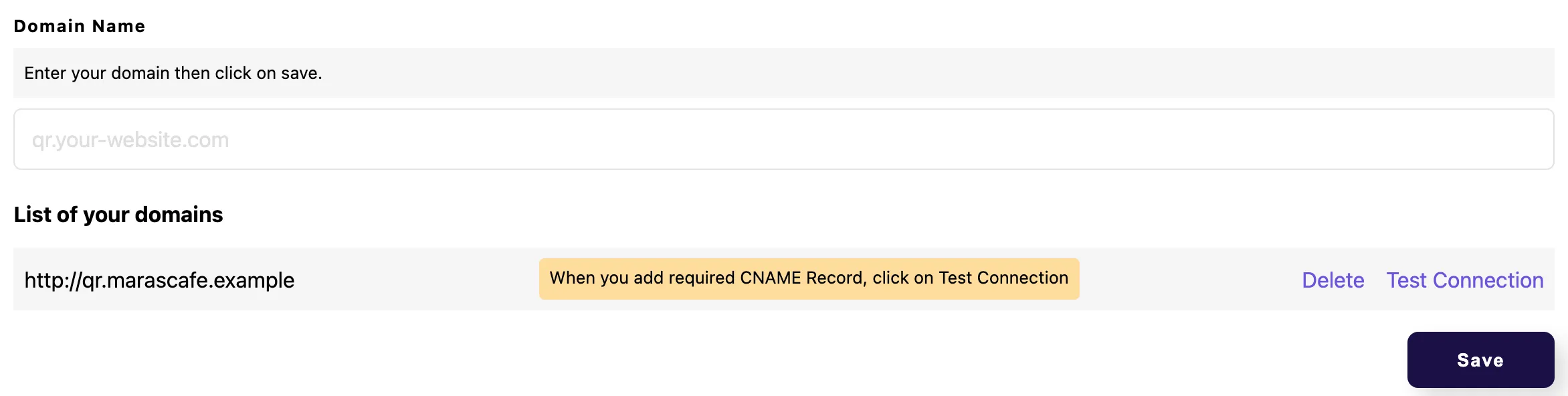
- Save and testType the domain under Domain Name and click Save. Then click Test Connection beside it in your list of domains.
- Wait for PublishedOnce the record is found, the domain shows In Progress while QRplify sets it up, within 24 hours. You get an email when it is published.
If the record is not there yet, the page says DNS record not found and shows the CNAME it expects. It may take up to 24 hours for a new record to be found.
Then open a code, click the edit icon by its short URL and pick your domain under Select domain. As with a slug, do it before you print.
Keep the domain once codes are out. If you delete it, every printed code that uses it stops working. The app asks you to confirm first, unless the domain is still a draft.
Plans
Which plans include a custom domain?
Unlimited and Lifetime. Custom short links are on every plan, Free included. Your own domain starts on Unlimited, $34.49 a month, and comes with Lifetime, $279 once.
The same 2 plans are white label, with no QRplify branding at all.
Every new account starts with 14 days of Premium, no card needed. Premium has no custom domain, so the trial does not either.
-
Free
$0 forever
No custom domain
-
Premium
$7.49 a month
No custom domain
-
Unlimited
$34.49 a month
Custom domains
-
Lifetime
$279 once
Custom domains
On every plan
- Custom short links
- Unlimited dynamic / editable QR codes
In the app
What does it look like in the app?
FAQ
Custom domain questions
Short answers, from what the app does today.
Can I use my own domain for QR codes?
Yes, on Unlimited and Lifetime. Point a CNAME record for a subdomain, such as qr.your-website.com, to QRplify, add the domain in your account, and your dynamic codes can use it.
Which DNS record does a QR code custom domain need?
A CNAME record at your domain registrar, pointing to the address the Add your domain page names. It may take up to 24 hours for the record to be found.
Can I change the short link of a QR code?
Yes, on every plan, for a dynamic code. Click the edit icon by its short URL and type a new slug. Do it before you print: printed codes stop working once the short URL changes.
Can I change a QR code’s domain after printing?
You can, but every printed copy stops working, because the domain is part of the short link the pattern holds. Pick the domain before you print.
Is a custom domain in the free trial?
No. The trial is 14 days of Premium, and Premium has no custom domain. It starts on Unlimited.
What happens if I delete my domain?
Every printed code that uses it stops working. The app asks you to confirm first, unless the domain is still a draft.
Do static QR codes have a short link?
No. A static code holds your link itself, so there is no short link to edit and no domain to pick.
Get started
Make a code with your own link
Static codes need no account. A free account adds unlimited dynamic codes that keep working, with no card.